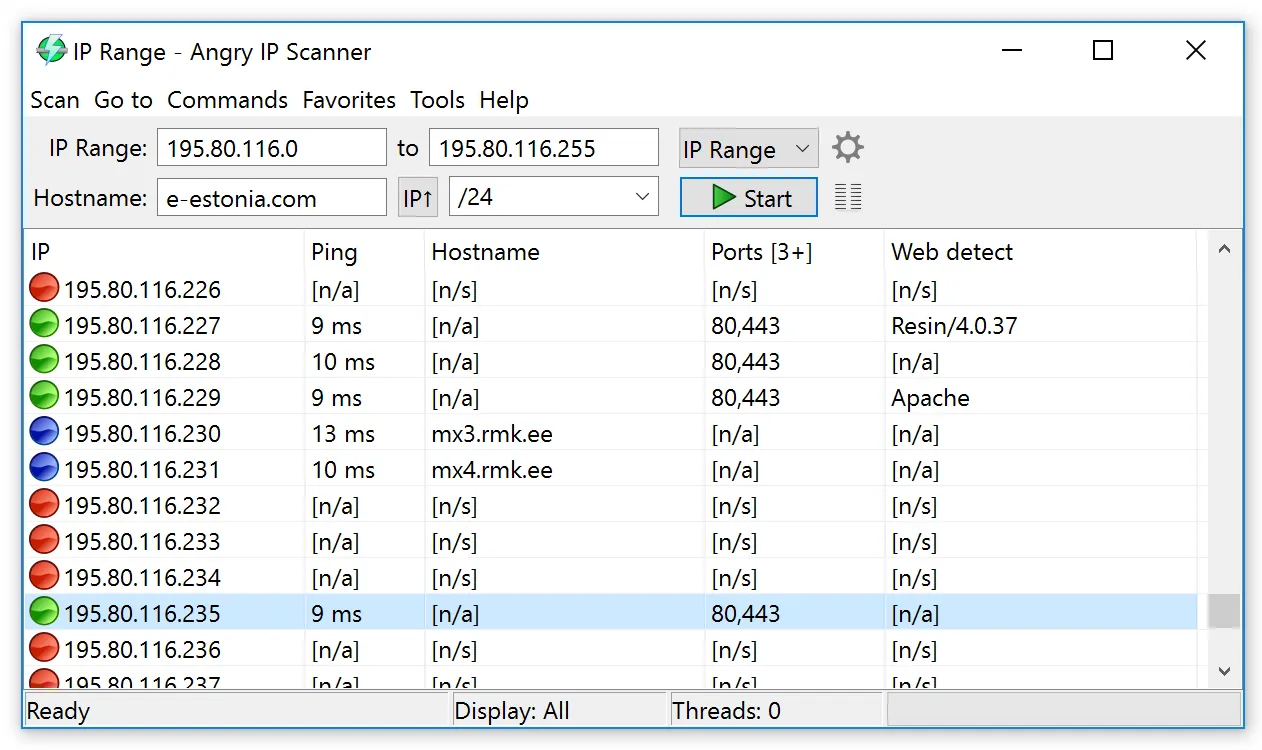
A switch in the warehouse closet has been swapped, the DHCP scope on VLAN 30 looks thinner than it should, and somebody asks which printers actually answered after the change. You need a list of live addresses in 10.30.0.0/24, their hostnames, maybe their MAC vendors, and whether anything is listening on 9100 or 443. That is the ten-minute job Angry IP Scanner was built for. Everything below assumes you are scanning your own or an explicitly authorized network.
What it does
Angry IP Scanner is an open-source scanner written by Anton Keks and released under GPLv2. It pings each address in a range, then runs a chain of optional “fetchers” against the hosts that respond: reverse DNS hostname, MAC address and vendor, open TCP ports, NetBIOS information (computer name, workgroup, logged-in user) and a simple web-server detector that grabs the HTTP Server header. Input can be a start/end range, a netmask-based range, a random sample, or a text file containing addresses in almost any format.
Hits fill a sortable grid, and export formats cover CSV, TXT, XML and an IP-port list. A command-line mode exists as well, so the same scan can run from a scheduled task or a shell script and drop a file for later diffing. Java developers can extend it with plugins that add new fetchers.
The current release at the time of writing is 3.10.0, tagged on the project’s GitHub page on August 31. That release requires Java 21 or newer, and the Windows and macOS builds now bundle a Java 25 runtime, so you no longer have to install a JRE separately on those platforms. It also turns on virtual threads by default, switches the default view to “Alive Only” and asks for confirmation before trusting plugins. Packages are published as MSI and EXE for Windows, DMG for macOS, DEB and RPM for Linux, plus a plain JAR.
Where it earns its spot on the bench
- Speed on a /24. A Class C sweep with default ping and hostname fetchers normally finishes in seconds rather than minutes, depending on timeouts and how many hosts are down.
- Same tool on every OS. If half the team lives on MacBooks and the NOC box runs Ubuntu, one scanner with one export format is simpler than three.
- Port lists you control. Set a port string such as
22,80,443,3389,9100under Preferences and every live host gets checked. That is enough to spot a stray RDP listener or a printer web UI on the wrong VLAN. - Scriptable. The CLI takes a feeder, an output file and flags, which makes a nightly sweep of the server subnet trivial. A typical call looks like
ipscan -f:range 10.30.0.1 10.30.0.254 -o hosts.csv -q; checkipscan --helpon your build for the exact switches. - Portable-friendly. The vendor states installation is not required, which suits a USB toolkit or a jump host where you would rather not leave software behind.
Where it comes up short, and who should leave it in the drawer
It is a discovery tool, not an inventory system. There is no agent, no database of history, no change alerting, and no scheduled scanning inside the GUI itself; you build that yourself with the CLI and a diff. It does not enumerate SMB shares or check share permissions, so if your real question is “which shares on the file server are writable by Domain Users”, look at LizardSystems Network Scanner instead.
MAC addresses only resolve for hosts on the same Layer 2 segment, because ARP does not cross a router. Very aggressive thread counts can also trip IDS thresholds or rate limits on managed switches, so tune the thread and timeout values before pointing it at a production core.
If you are a Windows-only shop that mostly wants one-click RDP and remote shutdown from the results list, Advanced IP Scanner may feel more natural.
Who it suits
Solo admins and small IT teams who need fast, repeatable sweeps across mixed operating systems; MSP technicians who move between client sites (with written authorization for each); anyone who wants scan output in CSV for Excel, Power BI or a quick Import-Csv in PowerShell. The guide on sweeping a VLAN and exporting live hosts to CSV shows the workflow end to end.
Licensing and cost
The licence is the GNU GPL version 2: Angry IP Scanner is open source and costs nothing. There is no paid edition, no per-seat fee and no feature gate, so putting it on every admin laptop costs nothing but patching time. Licensing terms can change between releases, so check the vendor’s site for the current position.
How it compares
Against Advanced IP Scanner, the trade is cross-platform reach and a CLI versus Windows-native remote actions such as Wake-on-LAN, RDP and Radmin integration; the Angry IP Scanner vs Advanced IP Scanner page lays the differences out feature by feature. Against LizardSystems Network Scanner, the split is breadth versus depth: Angry IP covers ports and hosts, while LizardSystems focuses on shared resources and access rights; see Angry IP Scanner vs LizardSystems Network Scanner. When a sweep turns up something odd and you need to see what is actually on the wire, Wireshark is the next tool. The full shelf lives in LAN & Port Scanners.
Getting it safely
The two legitimate sources are angryip.org and the GitHub releases page that angryip.org itself links to. Because it is a network scanner, repackaged copies on mirror sites are a common way to deliver bundled adware, so avoid them. After fetching, confirm the file name and size match the release page, and on Windows run Get-AuthenticodeSignature against it to see whether it carries a valid signature before you trust it. Our where to get it page covers the general routine.
FAQ
Does Angry IP Scanner still need Java installed?
On Windows and macOS, the 3.10.0 builds bundle a Java runtime, so no separate install is needed. On Linux, or if you use the plain JAR, you need Java 21 or newer.
Can it scan across subnets and VPNs?
Yes, ping, hostname and port fetchers work across routed links. MAC address and vendor only work on the local Layer 2 segment, and ICMP may be filtered by firewalls, so consider enabling a TCP port check as an alternative liveness test.
Is it safe to run on a corporate network?
It is a legitimate administration tool, but run it only on networks you own or are authorized to scan, and tell your security team first. An unannounced sweep looks exactly like reconnaissance to an IDS.
Can I automate a nightly scan?
Yes. Run the CLI from Task Scheduler or cron with an output file, then compare today’s CSV to yesterday’s with Compare-Object or diff to spot new hosts.