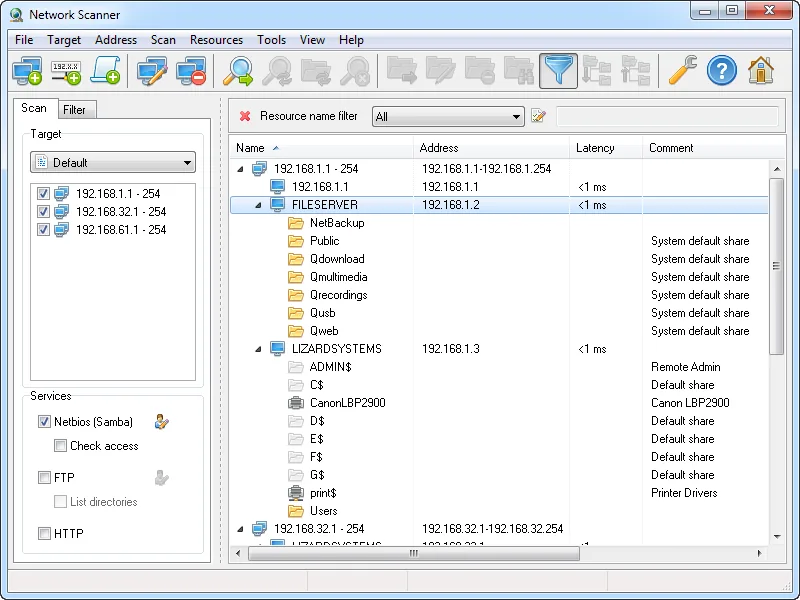
An auditor’s checklist lands on your desk with one line circled: “Confirm no departmental shares are writable by all domain users.” You know the file servers, but you also know about the old NAS in the design room, the scanner-to-folder share on the copier, and the C$-adjacent folders somebody shared from a workstation in 2019. Clicking through \\hostname in Explorer for two hundred machines is not a plan. LizardSystems Network Scanner exists for exactly this job: sweep ranges you administer, list every shared resource, and tell you which ones the current account, or an account you name, can read or write.
What it does
Network Scanner is a Windows desktop tool from LizardSystems. You give it IP ranges, single addresses or computer names, and it checks each host for online status, then enumerates shared resources. The vendor states it finds “system and hidden NetBIOS (Samba) shared resources along with FTP and web resources”, so hidden $ shares and Samba shares on Linux boxes and NAS appliances show up alongside ordinary Windows shares.
For every share it can test read and write access, either for the account running the scan or for another user you specify. That second option is the useful one for audits: run as yourself, but test as a low-privilege test account to see what a regular user would reach. From the results tree you can open a share in Explorer, map it as a network drive, or open FTP and web resources in a browser. Filters let you narrow the tree by resource type or by access rights, and version 21.07 added a filter for computers in the resources list.
Online status is checked by ping, or by connecting to TCP ports you specify, which helps when ICMP is blocked by Windows Firewall. It also pulls the NetBIOS or domain computer name and shows latency. Results can be saved inside the program and exported to HTML, TXT or XML. The vendor also lists remote shutdown and “send message” tools, plus configurable Network Tools and Administrative Tools menus. Scanning itself does not require administrator rights, according to the vendor.
Where it’s strong
- Share-centric view. Instead of a flat host list, you get a tree of hosts and their shares, which maps directly onto the question auditors actually ask.
- Access testing as another user. Checking effective read/write for a named account is the feature that turns a scan into evidence. The typical pattern is a dedicated, unprivileged audit account that mirrors a standard user’s group membership.
- Hidden and non-Windows shares. Administrative
$shares and Samba exports on appliances appear, which is where forgotten data usually hides. - Flexible input. Address expressions such as
192.168.1-2,5,20,25-27.1-254cover scattered server ranges in one pass.
Where it comes up short, and who should leave it in the drawer
Be clear-eyed about maintenance. As we write this, the newest build is still 21.07, dated July 7, 2021, and the vendor’s supported-OS list stops at Windows 10 and Server 2016. Windows 11 and Server 2019/2022/2025 are not listed. It may well run on them, but that is unverified by the vendor, and a tool that has not shipped an update in over five years deserves a test on a non-critical machine first.
It is not a port scanner. The port option exists only to decide whether a host is online. It does not claim MAC address or vendor detection, SNMP, IPv6 scanning, Wake-on-LAN, CSV export or a command-line interface, so if you need those, look at Angry IP Scanner or Advanced IP Scanner. No portable edition is offered; there is an install package with a non-admin install mode.
Skip it if a data-access governance product already covers your shares, or if your admin machines are not Windows.
Who it suits
Windows administrators at small and mid-size organizations who need a periodic, repeatable check of what is shared and to whom, particularly before an audit, after a file-server migration, or when a ransomware tabletop exercise asks “what could a compromised user account have encrypted?” Our guide on auditing writable SMB shares on your own LAN walks through that exact workflow. Only scan networks you own or are authorized to assess.
Licensing and cost
At the time of writing, the vendor offers two licence types. A Personal License is free for non-commercial use and perpetual. A Business License costs US$79.95 per machine; it is perpetual and includes a year of free updates plus support by email or ticket. The FAQ is explicit that every installation on a separate machine needs its own licence, so budget per admin workstation, not per scanned host. Volume and site licensing are available by contacting the vendor. The FAQ also describes an evaluation mode with nag screens that works on one computer; the vendor’s pages do not fully spell out how that interacts with the free personal licence, so read the EULA before deploying. Check the vendor’s current pricing page before purchasing.
How it compares
Next to Angry IP Scanner, this is the narrower but deeper tool: Angry IP tells you what hosts and ports are alive; Network Scanner tells you what those hosts share and who can write there. The trade-offs are detailed in Angry IP Scanner vs LizardSystems Network Scanner. For planning the address ranges you will feed it, the same vendor’s LanCalculator handles subnet maths. Microsoft’s free Sysinternals Suite includes ShareEnum and AccessEnum, which cover some of the same ground from a different angle. Browse the rest in LAN & Port Scanners.
Getting it safely
Obtain it only from lizardsystems.com. The vendor publishes a SHA-256 hash for the current package on the product and release pages, so verify it before running anything:
Get-FileHash .\<package-name>.exe -Algorithm SHA256Compare the output to the value on the vendor’s release page for 21.07. Avoid third-party mirrors, which may carry older builds or bundled extras. See where to get it for the general checklist.
FAQ
Does it check NTFS permissions or share permissions?
It tests effective access: whether the chosen account can actually read or write through the share. That reflects the combination of share and NTFS permissions, but it does not list individual ACL entries.
Can it scan Linux and NAS devices?
The vendor states it finds Samba shares as well as FTP and web resources, so SMB exports on Linux servers and NAS appliances should appear.
Is it supported on Windows 11?
Windows 11 is not on the vendor’s supported list at the time of writing. Test it on a non-production machine before relying on it.
Does it need admin rights?
Scanning does not, per the vendor. Seeing administrative $ shares still depends on the permissions of the account you test with.
What does a business licence cover?
One machine, perpetually, with one year of updates and support at the time of writing. Each additional workstation needs another licence.