A vendor needs the last week of application logs from a Linux box, the firewall wants its config backup pulled before tonight’s firmware upgrade, and a nightly job should push a CSV to a partner’s SFTP server without anyone logging in. None of this needs a big managed file transfer platform. It needs a reliable client on Windows that speaks the right protocols and can be scripted. WinSCP has filled that slot on Windows admin machines for many years.
What it does
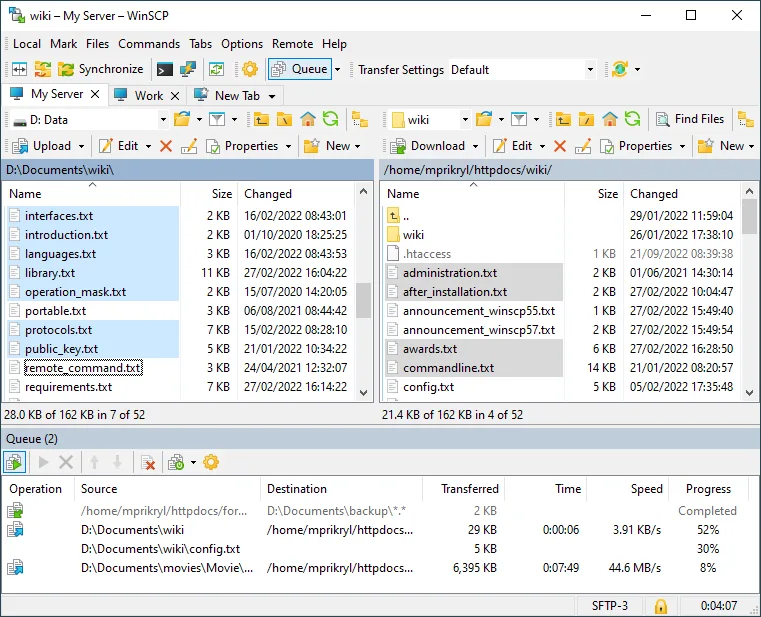
WinSCP, developed by Martin Přikryl, is a file-transfer client for Microsoft Windows. The vendor lists support for SFTP, SCP, FTP, FTPS, WebDAV and Amazon S3. You get a choice of two interfaces: a Commander view with local and remote panels side by side, or an Explorer view that behaves like a Windows folder window.
Beyond drag-and-drop, the features that matter to admins are:
- Integrated text editor, so you can open
/etc/nginx/nginx.conf, edit it and save it back without a separate step, plus hooks to use your own editor. - Synchronization: keep a local folder and a remote directory in step, one way or both, with a preview of what will change.
- Keep remote directory up to date, which watches a local folder and pushes changes as they happen.
- Scripting and command line: a text scripting language run via
winscp.com, plus a .NET and COM library for PowerShell, C# or VBScript. - Portable use, documented by the vendor, for running from a USB stick without installing.
- PuTTY integration: import saved PuTTY sessions and open a PuTTY terminal on the current host.
A minimal scripted pull looks like this:
winscp.com /ini=nul /log=C:\logs\pull.log /command ^
  "open sftp://backup@10.0.20.15/ -hostkey=""ssh-ed25519 255 xxxxxxxx...""" ^
  "get /var/backups/fw-*.tgz C:\backups\" ^
  "exit"
Pinning the host key in the script, rather than accepting any key, is the detail that separates a safe automation from a risky one.
At the time of writing, the current stable release is 6.5.7 (September 9, 2026), which pulls in security fixes from PuTTY 0.85 and OpenSSL 3.4.6. A 6.6.3 release candidate (September 3, 2026) is available for testing and brings updated translations and dark-theme improvements.
Where it’s strong
- Protocol range in one tool. SFTP to Linux, FTPS to an old appliance, WebDAV to a document system and S3 to a bucket, all from one client and one session list.
- Automation that is actually documented. The scripting reference and the .NET assembly examples are thorough. PowerShell users can load
WinSCPnet.dlland write transfers with proper error handling and session logging. - Script generation. The GUI can generate a script or code snippet for the session and transfer you just set up, which removes most of the guesswork from the first automation.
- Fast security updates. It tracks PuTTY and OpenSSL fixes, as the 6.5.7 release shows.
- Free and deployable. Silent deployment switches and a portable mode make it easy to standardize.
Where it comes up short, and who should leave it in the drawer
It is Windows only. Mac and Linux users will need something else, which splits a team that shares documentation.
It is not an SSH terminal. WinSCP can run single commands on the remote host and launch PuTTY for an interactive shell, but for real console work you want PuTTY or Windows Terminal with OpenSSH.
Stored passwords are a real risk. WinSCP can save credentials in the session, and many admins do so for convenience; protect them with a master password, or better, use key-based authentication via Pageant. For scheduled jobs, keep keys and scripts in a location only the service account can read.
It is also not a managed file transfer server. There is no central audit, no delivery-assurance queue and no web portal for partners. If you need those, you are in a different product category. And very large S3 or WebDAV workloads may be better served by the provider’s own CLI.
Who it suits
Windows admins who move files to and from Linux servers, network appliances and cloud storage; anyone who needs a scheduled, scripted SFTP transfer without buying MFT software; helpdesk teams that want a friendly UI for occasional pulls of logs. It is especially useful when paired with PuTTY on the same machine.
Licensing and cost
WinSCP is free software released under the GNU General Public License, version 3 or later. There is no paid edition and no per-seat licence; you can deploy it on as many machines as you need. The GPL obligations only apply if you redistribute modified versions. Terms can change, so check the vendor’s site.
How it compares
Against PuTTY, it is a partner more than a rival: PuTTY is the shell, WinSCP moves files, and each can hand off to the other. The PuTTY vs WinSCP page covers when to use which, including pscp and psftp as command-line alternatives. Before transferring anything to an unfamiliar device, Angry IP Scanner can confirm port 22 is open on the host you expect. Related tools are grouped under SSH, Telnet & File Transfer.
Getting it safely
Get WinSCP only from winscp.net. Check the checksum shown on the vendor’s site where one is published, and confirm the code signature before running:
Get-FileHash .\<winscp-package>.exe -Algorithm SHA256
Get-AuthenticodeSignature .\<winscp-package>.exe | Select-Object Status
Look-alike sites have used the WinSCP name, so check that the address bar really says winscp.net before you run anything. See where to get it for the full checklist.
FAQ
Does WinSCP support SSH keys?
Yes. It accepts PuTTY .ppk keys and can convert OpenSSH keys, and it can use keys loaded in Pageant.
Can I schedule a transfer?
Yes. Write a script for winscp.com or a PowerShell script using the .NET assembly, and run it from Task Scheduler under a dedicated service account.
Is WinSCP free for commercial use?
Yes. It is GPLv3-or-later free software with no paid tier.
Does it work with Amazon S3?
The vendor lists S3 among supported protocols, alongside SFTP, SCP, FTP, FTPS and WebDAV.
Can it run without installation?
The vendor documents a portable mode for running it without a full install.